
Some files are private or not ready yet, if a link gives you a 404 that's why :)
This is a work in progress, new notes will be added daily
List of note Indexes
-
🔒 PROJECTS -
🌐 ART -
🌐 TECHNOLOGY -
🔒 SCIENCE -
🔒 PHILO-PSYCHO -
🔒 HISTORY -
🔒 HEALTH -
🔒 GAMING -
🌐 KNOWLEDGE
                .... |\| .|||.    |\/|  .|\\. .|.
              .\\||/|.  .\|..||  .\|..|||...||.....
            .|   .....||.|\\\\\\    ... |\\\/. .\\. .||
        .\\|   .|\\|..|\\ .\\\\  .\\|. .\\\\\|  |\| |\\|
        |\\  |\\|..  /\\\. |\|\\   \\\\|.   .|\\. .\\\\|
        .\\. |\\\\\\\|.. .\\|      .\\||\\/|. |\\|     .|/\|
      \. .\\\||/\|....   \\| |\/   |\\\  |\\\| .\\|  \\| ....
    |\/  |\\| |\\\\\\\| |\|.\\\   \\\\. |\\\\| |\\  \\.  ||..
      ..|||\|  .. .\\\\. |\\\\\\  .\\|....|\\\. |\\\\\\  |/. |/
    \\\|..   .\\\ |\\. .\\\| \\|   |||\\\.  ...|\\/||.  .\\\
  |\|  |\/.  /\\\\\| .\\\\. \\.   .../|.   .|\\\|.   |\\\|  |\\
    .  |||\\|.  ..||| .\\|.  |\|  \\|..../\\| |\\|  .\\\\\   ..
    \\|  .||\|.|..      |\\\|./\  \\||\. ||...    .\\\\/.  |\/||
    ..|/||.   |\\\\\|.     .|/\|  ||.        .||\\\     .|||. |\
  .\/|  \\\. .|\\\|||\\\||..       .|\\\\\\\|\\\\.  /\\\\||. |
    .|| |\\\\|  .......|\\\\\\.  .\\\. ..|||....  .\\\\|.. ...
    \\||....|\\\\\\\\||\\\\\\\/   |\|....|||\\\\\\\/....|\\\|
      ||.|\||\\| .....|\\\\..\\|    .|\\\. ||........ .|\|...
          . |\  /\\/\\\\\\. |\.  .\\\\\\.  ./\\\\/  |\\\||.
        .|\.|\| .|\|... ..              ./\\|..|\\|  ..
            .|\\|  .\\\\.\\\\\\\   \||...\\\|..|\\\|.||
                |\. ..||....||     ... ..||\\\. .|.
                        ...            .......
↑ Blender
Blender 4.1 Release Notes
Overview
Animation & Rigging
Bone Collections
- Bone Collections are now hierarchical
- Visibility is determined by the bone collection itself, and its ancestors, hiding a bone collection will also hide its children
- Bone Collections can be 'solo'ed with the ☆ icon.
- When any bone collection is marked as 'solo', shown as ★ in the interface, the regular visibility options (the 👁 icon) are overridden. Only the bone collections with a ★ are then shown.
- An Un-Solo All operator is available to disable all 'solo'ed bone collections, and return to the regular visibility rules.
Weight Paint: Bone Selection
Bone selection mode is made explicit when you enter weight paint mode with an armature, In previous versions, this mode would be enabled implicitly when both 'vertex' and 'face' selection modes were turned off
Keying
- Pressing
Iin the viewport no longer pop up a menu of keying sets. It will use newly added options in the Preferences. - There is a new hotkey
Kin Object and Pose Mode which pops up the Keying Set menu. This shows the menu even if a keying set is active in the scene. - The hotkey to change the active Keying Set has been changed from
Ctrl+Shift+Alt+ItoShift+K. - When the User Preference option "Pie Menu on Drag" (in the "Keymap" category) is enabled, holding
Iand moving the cursor will show a pie menu to insert one of Location, Rotation, Scale and Available.
Motion Paths
Add an option to create motion paths relative to the active camera. This means the motion paths will appear when looking through that camera.
Compositor
More nodes are supported by the viewport compositor.
Cycles
OpenImageDenoise is now GPU accelerated
EEVEE
Light Probes types have been renamed:
- Reflection Cubemap to Sphere
- Reflection Plane to Plane
- Irradiance Grid to Volume
Geometry Nodes
- Added a
Bakenode, bake node and simulation baking can save references to geometry materials- Baked data-block references can be managed in the "Data-Block References" panel of the node editor sidebar.
- Volumes can be baked as part with simulation nodes or the bake node
- The Musgrave Texture node was replaced by an extended Noise Texture node (see Rendering).
- Menu Switch allow switching between options
- Split to Instances node allows separating a geometry into multiple pieces based on a group ID
- Index Switch node allows choosing between inputs
- Sort Elements node allows reordering geometry elements based on some sort key
- The Rotate Rotation node replaces the Rotate Euler node
Auto Smooth
The mesh "Auto Smooth" option has been replaced by a modifier node group asset, Blender automatically chooses whether to calculate vertex, face, or face corner normals given the presence of custom normals and the mix of sharp/smooth edges and faces. (see Modeling)
Import & Export
File Handlers allow developers to extend traditional file "import" operators with drag-and-drop behavior throughout the Blender UI.
Supported file formats: Alembic, Collada, Grease Pencil SVG, OBJ, OpenUSD, PLY, and STL
Modeling
Auto Smooth
- The base state of meshes is now the same as having "Auto Smooth" on with an angle of 180 degrees in older versions
- In edit mode, the new Set Sharpness by Angle operator can be used to set sharpness, or "Shade Smooth by Angle" in other modes
Rendering
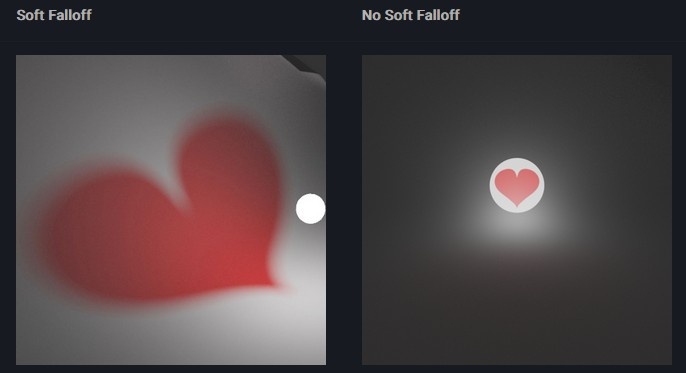
- Point and Spot lights have a new Soft Falloff option, that makes the lights render the same as in Blender 3.6 and earlier.
- Depending on whether Soft Falloff is applied, the light texture behaves differently. With Soft Falloff, the light radius acts as a blurring factor for the projected texture; without Soft Falloff, the texture is directly visible on the spherical light source.
- The Musgrave Texture node was replaced by the Noise Texture node. Existing shader node setups are converted automatically, and the resulting renders are identical.